Dairy — food production
PLC-to-PLC Data Exchange — S7-1200 and S7-300 over PUT/GET
Linked a newer S7-1200 to an existing S7-300 in a dairy plant with S7 PUT/GET communication, so the two controllers share data over Ethernet instead of extra hardwired signals.
- Role
- PLC programmer — PUT/GET communication between the two controllers, testing on site
- Company
- P.A.M Engineering & Automation
- Period
- Jan 2024 – Dec 2024
- Platforms
- Siemens S7-1200 · Siemens S7-300 · TIA Portal V17 · S7 communication (PUT/GET) · PROFINET
Highlights
- Two generations of Siemens PLC sharing data over Ethernet with no extra wiring
- Shared data laid out at fixed addresses so both CPUs read the same bytes the same way
- Communication status checked so a lost link is seen, not silently ignored
Problem
A dairy plant ran part of its process on an older S7-300 and was adding equipment controlled by a newer S7-1200. The two controllers had to share data. Running extra hardwired signals between panels in a hygienic production area is slow and leaves no room to add more later.
My role & scope
I programmed the communication between the two PLCs with Siemens S7 PUT/GET and tested it on site with the plant team, in a production area with hygiene rules — hair nets, gowns and shoe covers on every visit.
Approach
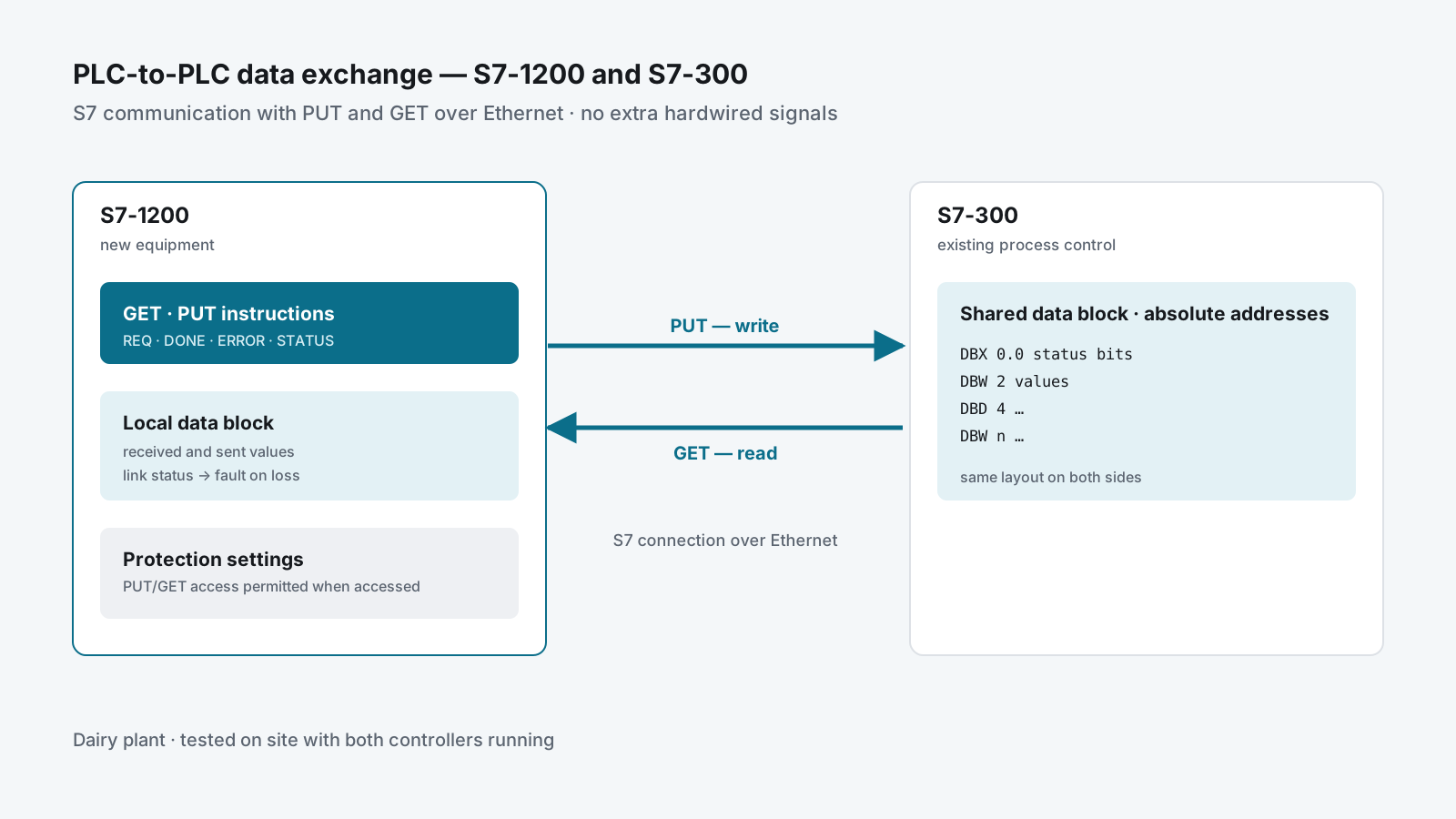
S7-1200  ──GET──►  reads the S7-300's data block
         ──PUT──►  writes into the S7-300's data block
                      (S7 connection over Ethernet)
Use what both CPUs already speak
S7-300 and S7-1200 share S7 communication, so PUT and GET need no gateway and no extra licence. One PLC reads (GET) and writes (PUT) data areas in the other over the plant network.
Fixed addresses on both sides
The S7-300 works with absolute addresses, so the data exchanged is laid out in data blocks at fixed offsets, the same on both ends. A block that the partner reads cannot be an optimised block, and PUT/GET access has to be permitted in the S7-1200’s protection settings when it is the one being accessed.
Know when the link is down
Each PUT and GET returns done, error and status. The program watches those outputs, so a communication failure shows up as a fault instead of the machine quietly running on old values.
Delivery
- Communication programmed and tested in TIA Portal
- Tested on site with both controllers running in the plant
- Handover of the updated programs
Result
- The S7-1200 and the S7-300 exchange data over Ethernet with no added hardwired signals
- New signals can be added by extending the data blocks instead of pulling new cables
Skills used
Siemens S7-1200 and S7-300 · TIA Portal V17 · S7 communication (PUT/GET) · data-block layout for absolute addressing · communication diagnostics · working in a hygienic food plant.